
Ever open Gmail or Outlook and see a button that says:
“Compose”
…then wonder:
“Wait, what does that even mean?”
Honestly?
A lot of people get confused by this word.
Especially if you’re:
- New to email
- Using a computer for the first time
- Helping parents or grandparents
- Switching email apps
- Learning office tools
Because “compose” honestly sounds kinda formal.
Like music class or something.
But in email?
It’s actually super simple.
When email apps say:
“Compose Email”
they basically mean:
“Start writing a new email.”
That’s it honestly.
Still though, there are lots of little things people don’t understand about composing emails:
- What each section means
- How email writing works
- When to use CC or BCC
- How attachments work
- Why drafts exist
So let’s break the whole thing down simply.
What Does Compose Email Mean?
Compose email means:
creating or writing a brand new email message.
When you click:
Compose
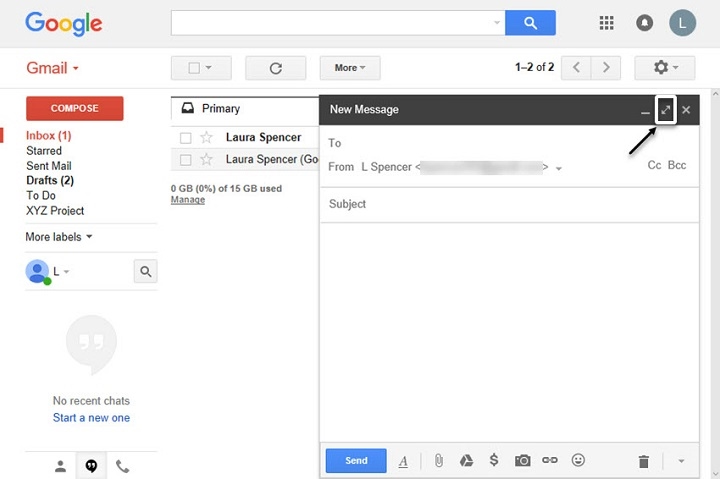
your email app opens a blank message window where you can:
- Write text
- Add recipient
- Attach files
- Add subject line
- Send message
Very simple honestly.
Why Email Apps Use the Word “Compose”
Because technically:
“compose” means:
to create or write something.
Like:
- Compose music
- Compose a letter
- Compose a message
Old computer systems loved formal wording honestly.
Where Is the Compose Button Usually Located?
Most email apps place it:
- Top-left corner
- Big colored button
- Easy to notice
Usually says:
- Compose
- New Message
- New Email
- Write
Depends on the app honestly.
What Happens When You Click Compose?
Usually a new blank email window appears.
Inside you’ll see sections like:
- To
- Subject
- Message body
- Attachments
That’s your email workspace honestly.
What Is the “To” Field?
This is where recipient email addresses go.
Basically:
who receives the email.
Example:
[email protected]
Very important honestly.
What Is the Subject Line?
The subject explains:
what email is about.
Like:
- Meeting Tomorrow
- Job Application
- Project Update
Good subjects help people understand emails quickly and honestly.
What Is the Email Body?
That’s the main message area.
Where you actually type:
- Questions
- Information
- Requests
- Conversations
Basically the actual email itself.
What Happens After You Finish Composing?
Usually:
- Click Send
- Email uploads
- Message reaches recipient inbox
Simple honestly.
What Is Draft Email While Composing?
Sometimes you don’t finish writing immediately.
Email apps automatically save:
Drafts.
Drafts are unfinished emails stored temporarily.
Very useful honestly.
Why Drafts Matter
Because people accidentally:
- Close windows
- Lose internet
- Get distracted
Drafts prevent losing everything honestly.
How Gmail Compose Works
Gmail uses a very simple compose window.
Usually:
- Click Compose
- Small popup appears
- Fill details
- Send email
Very beginner-friendly honestly.
How Outlook Compose Works
Microsoft Outlook works similarly.
Outlook often gives:
- More formatting tools
- Attachments
- Calendar integration
- Business features
Especially in work environments.
What Is CC in Email Compose?
CC means:
Carbon Copy.
Additional recipients receive a copy of the email.
Everyone can see CC recipients honestly.
What Is BCC?
BCC means:
Blind Carbon Copy.
Recipients cannot see other BCC addresses.
Very useful for privacy honestly.
When Should You Use CC?
Usually for:
- Team updates
- Informational emails
- Keeping people in loop
When Should You Use BCC?
Usually for:
- Large email lists
- Privacy protection
- Mass emails
Very important honestly.
Can You Attach Files While Composing?
Absolutely.
Most compose windows allow:
- Documents
- PDFs
- Photos
- Videos
- ZIP files
Usually through a paperclip icon.
Why Attachments Sometimes Fail
Usually because:
- File too large
- Weak internet
- Unsupported format
Very common honestly.
What Is Rich Text Formatting?
Compose windows often allow:
- Bold text
- Colors
- Fonts
- Bullet points
- Links
Makes emails easier to read honestly.
Should Emails Be Formal?
Depends honestly.
Work Emails
Usually more professional.
Friends and Family
Way more casual.
Tone matters a lot honestly.
Common Parts of a Professional Email
Usually:
- Greeting
- Main message
- Closing line
- Signature
Simple honestly.
Example of Simple Email Structure
Usually something like:
- Hi Sarah,
- Quick message here
- Thanks,
- John
Very normal honestly.
Can You Save Emails Without Sending?
Absolutely.
That’s what drafts are for honestly.
Very useful for:
- Long emails
- Emotional messages
- Work reviews
Why People Overthink Email Composing
Honestly?
Because email feels permanent sometimes.
Especially work emails.
People worry about:
- Tone
- Typos
- Mistakes
- Looking professional
Very normal honestly.
Can You Edit Emails After Sending?
Usually no.
Some apps offer:
- Undo Send
- Recall features
But time limits are short honestly.
What Is Undo Send?
Temporary delay before email fully sends.
Lets you cancel mistakes quickly.
Very helpful honestly.
Can Composed Emails Automatically Save?
Usually yes.
Modern email apps autosave drafts constantly.
Huge lifesaver honestly.
Why Composed Emails Sometimes Disappear
Usually because:
- Browser crash
- Sync problems
- App bugs
- Draft deletion
Rare but annoying honestly.
Difference Between Reply and Compose
People confuse these too.
Compose
Creates brand new email.
Reply
Responds to existing email.
Big difference honestly.
What Is Reply All?
Replies to:
- Original sender
- Everyone included in conversation
Can get chaotic honestly.
Can You Compose Emails Offline?
Sometimes yes.
Apps may store drafts locally until the internet returns.
Very useful honestly.
Why Email Composition Matters at Work
Because clear emails:
- Save time
- Reduce confusion
- Improve communication
- Prevent mistakes
Honestly a huge skill professionally.
Common Email Composition Mistakes
People make these constantly.
Forgetting Attachments
Classic honestly.
Empty Subject Lines
Confuses recipients.
Sending Too Quickly
Creates regrets fast.
Wrong Recipient
Autocomplete disasters happen honestly.
Huge Paragraphs
Hard to read.
Best Practices When Composing Emails
Want better emails?
Do this stuff.
Keep Subject Clear
Helps people instantly understand.
Use Short Paragraphs
Much easier to read honestly.
Double-Check Recipients
Very important.
Review Attachments
Classic mistake prevention honestly.
Read Before Sending
Tiny reviews help massively.
How Businesses Use Email Composition Tools
Modern business email apps often include:
- Templates
- Signatures
- Scheduling
- Spellcheck
- AI suggestions
Very advanced honestly.
Can Phones Compose Emails Too?
Absolutely.
Most people honestly compose emails mostly on phones now.
Mobile apps support:
- Attachments
- Drafts
- Formatting
- Signatures
Very convenient.
Why Email Still Matters So Much
Even with messaging apps honestly…
Email remains huge for:
- Work
- School
- Business
- Legal communication
- Official records
A very important tool still.
FAQs About Compose Email
What does compose email mean?
It means creating a new email message.
Is composing the same as writing an email?
Yep basically.
What happens when I click compose?
A blank email window opens.
What is the subject line?
Short title explaining email topic.
Can I save emails before sending?
Absolutely through drafts.
What’s the difference between compose and reply?
Compose starts a new email. Reply answers the existing one.
Can I attach files while composing?
Yep very easily.
Does Gmail have a compose button?
Absolutely.
“Compose email” honestly sounds more complicated than it really is.
At the end of the day?
It simply means:
starting a new email message.
That’s it.
Once you understand the basic parts:
- To field
- Subject line
- Message body
- Attachments
- Send button
…email composing becomes pretty easy honestly.
And after a while?
You stop even thinking about the word “compose” at all.
You just click it and start typing naturally.
