
Ever try explaining an old email conversation to someone…
and halfway through realize:
“You know what? I should just send them the actual email.”
Yeah honestly?
That happens constantly.
Especially at work.
Maybe:
- Your boss needs proof of something
- Customer support asked for the original email
- You need to share a receipt
- Someone asked for a conversation thread
- You’re forwarding project details
And then comes the confusing part:
“Wait… how do I attach one email inside another email?”
Because honestly?
Most people know how to attach:
- PDFs
- Photos
- Documents
But attaching an actual email?
That feels weirdly hidden.
Good news though.
Most email apps support it.
And once you know where the option is, it’s honestly pretty easy.
Let’s break down exactly how attaching emails works and the easiest ways to do it without accidentally creating total inbox chaos.
What Does Attaching an Email Mean?
Attaching an email means:
including one email message inside another email as a file or attachment.
Instead of:
copying text manually.
You’re basically:
sending the original email itself.
Very useful honestly.
Why People Attach Emails
Lots of reasons honestly.
Sharing Important Conversations
Especially work discussions.
Sending Proof
Invoices, confirmations, approvals.
Customer Support Issues
Support teams ask for original emails constantly.
Keeping Formatting Intact
Attachments preserve original message layout.
Legal or Business Records
Forwarded text sometimes changes details.
Difference Between Forwarding and Attaching an Email
People confuse this constantly.
Forwarding
Copies email content into a new message body.
Attaching
Adds original email as separate file attachment.
Big difference honestly.
Why Attaching Is Sometimes Better Than Forwarding
Because attaching preserves:
- Original formatting
- Timestamps
- Attachments
- Metadata
- Headers
Much cleaner honestly.
Can Gmail Attach Emails to Emails?
Yep.
Gmail actually supports this surprisingly well now.
How to Attach an Email in Gmail
Usually:
- Open Gmail
- Start new email
- Drag existing email into draft
Seriously, that’s it honestly.
The email becomes attached automatically.
Gmail Email Attachments Become .EML Files
Usually attached emails appear as:
.EML files.
These preserve original message data.
Alternative Gmail Method
Another option:
- Right-click email
- Select Forward as attachment
Very useful honestly.
Can Multiple Emails Be Attached at Once in Gmail?
Absolutely.
You can drag several emails into one draft.
Very handy for:
- Work threads
- Support tickets
- Documentation
How Outlook Handles Email Attachments
Microsoft Outlook honestly handles attached emails extremely well.
Especially desktop Outlook.
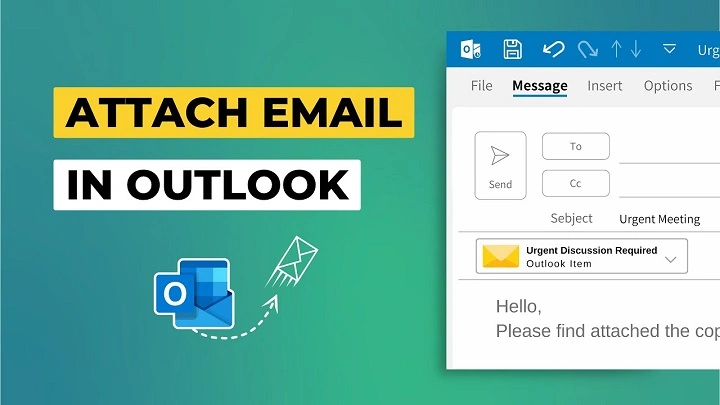
How to Attach an Email in Outlook
Usually:
- Open new email
- Drag email into message
- Email becomes attachment
Very easy honestly.
Outlook “Forward as Attachment” Option
Outlook also offers:
Forward as Attachment.
Usually:
- Right-click email
- Choose Forward as Attachment
Very professional honestly.
Why Businesses Love Outlook Email Attachments
Because Outlook preserves:
- Thread structure
- Metadata
- Attachments
- Business formatting
Very useful in offices honestly.
Can Yahoo Mail Attach Emails?
Yahoo Mail is more limited, honestly.
Usually forwarding works easier than attaching there.
What About Apple Mail?
Apple Mail also supports email attachments.
Usually:
drag email into a new message draft.
Simple honestly.
What Happens When Someone Opens Attached Email?
Usually:
the attached email opens like:
a separate message file.
They can read:
- Sender
- Subject
- Content
- Attachments
- Dates
Basically the entire original email.
Can Attached Emails Include Their Own Attachments?
Yep honestly.
Often attached email preserves:
its original files too.
Very useful for documentation.
Why Attached Emails Look More Professional Sometimes
Because forwarding can:
- Break formatting
- Remove context
- Create messy chains
Attachments preserve cleaner records honestly.
Can You Attach Emails on Phones?
Sometimes honestly.
But desktop apps usually work much better.
Mobile email apps often have:
limited attachment tools.
Why Email Attachments Matter in Business
Huge honestly.
Especially for:
- Legal records
- Customer service
- Contracts
- Approvals
- Compliance
Attached originals matter.
What Is an .MSG File?
Outlook often saves attached emails as:
.MSG files.
Basically Outlook’s email file format.
What Is an .EML File?
More universal email file format.
Used commonly by:
- Gmail
- Apple Mail
- Many systems
Very compatible honestly.
Can Attached Emails Be Edited?
Usually not directly honestly.
They preserve the original message mostly unchanged.
Can Attached Emails Be Downloaded?
Absolutely.
Recipients can usually:
- Save attached email
- Open later
- Archive it
- Forward it
Very flexible honestly.
Are Attached Emails Secure?
Depends honestly.
They still contain:
- Original information
- Attachments
- Conversations
- Metadata
Always check content carefully before sending.
Why People Accidentally Share Too Much
Because attached emails may include:
- Old threads
- Hidden replies
- Personal details
- Internal conversations
Very common honestly.
Should You Review Emails Before Attaching?
Absolutely yes.
One of the smartest habits honestly.
Common Reasons Email Attachments Fail
People run into these constantly.
File Too Large
Huge email chains cause issues.
Unsupported File Formats
Rare but possible.
Mobile App Limitations
Phones often struggle more.
Security Restrictions
Work systems may block email files.
Why Some Companies Block .EML or .MSG Files
Security concerns honestly.
Attached email files can occasionally:
contain malicious content.
Some businesses restrict them.
Can Attached Emails Trigger Spam Filters?
Sometimes yes.
Especially:
- Huge chains
- Lots of attachments
- Unknown senders
Moderation helps honestly.
How to Save an Email Before Attaching
Sometimes it’s easier honestly.
Usually:
- Save email as file
- Attach manually later
Helpful for organization.
Difference Between Attaching and Screenshotting Emails
Huge difference honestly.
Screenshots
Good for:
quick visual sharing.
Attached Emails
Better for:
- Full conversations
- Searchability
- Professional records
- Metadata preservation
Can You Print Attached Emails?
Usually yes.
Once opened:
they behave like regular emails.
Best Practices for Attaching Emails
Want cleaner email sharing?
Do this stuff honestly.
Review Entire Thread First
Very important.
Remove Sensitive Information
Protect privacy honestly.
Explain Why You’re Attaching It
Adds clarity.
Avoid Huge Attachment Chains
Can overwhelm recipients.
Use Clear Subject Lines
Makes organization easier.
Common Mistakes When Attaching Emails
People do these constantly.
Forwarding Instead of Attaching
Different results honestly.
Sending Wrong Conversation
Very awkward sometimes.
Forgetting Existing Attachments
Easy mistake honestly.
Not Checking Hidden Replies
Can accidentally expose private info.
Attaching Too Many Emails at Once
Creates inbox chaos honestly.
Why Customer Support Teams Request Attached Emails
Because attached originals preserve:
- Error details
- Headers
- Metadata
- Timestamps
Makes troubleshooting easier.
Can You Attach Emails to Calendar Invites?
Sometimes depending on the email system honestly.
Especially Outlook business setups.
Why Lawyers and HR Departments Use Attached Emails
Documentation honestly.
Attached originals help preserve:
exact records.
Very important professionally.
FAQs About Attaching Emails
Can Gmail attach emails to emails?
Absolutely.
Does Outlook support attached emails?
Very well honestly.
What’s the difference between forward and attach?
Forward copies text. Attach sends original email file.
Can attached emails include files?
Usually yes.
Are attached emails safe?
Usually, but always review content carefully.
Can phones attach emails?
Sometimes, but desktops work better.
What file type do attached emails use?
Usually .EML or .MSG.
Why do businesses attach emails?
For records, support, and documentation.
Attaching an email to another email honestly sounds more complicated than it really is.
Most modern email systems make it surprisingly easy once you know:
- where the feature is
- what dragging emails does
- how forwarding differs from attaching
And honestly?
Attached emails often look way cleaner and more professional than giant messy forwarded chains.
Especially when:
- preserving records matters
- context matters
- attachments matter
- professionalism matters
Because sometimes copying and pasting email conversations manually?
Honestly just creates way more confusion than necessary.
