
Ever get an email so important you think:
“Yeah… I probably should save this somewhere.”
Could be:
- receipts
- flight tickets
- invoices
- job offers
- contracts
- school emails
- conversations you don’t wanna lose
And honestly?
Keeping important stuff only inside your inbox feels risky sometimes.
Emails get deleted.
Accounts get hacked.
Things disappear.
Search stops working.
Folders become chaos.
That’s why lots of people save emails as PDFs instead.
Super useful honestly.
PDFs are:
- easy to store
- easy to print
- easy to share
- harder to accidentally change
And good news?
Saving emails as PDFs is way easier than most people think.
Let’s break down exactly how it works across Gmail, Outlook, phones, laptops, and everything else.
What Does Saving an Email as a PDF Mean?
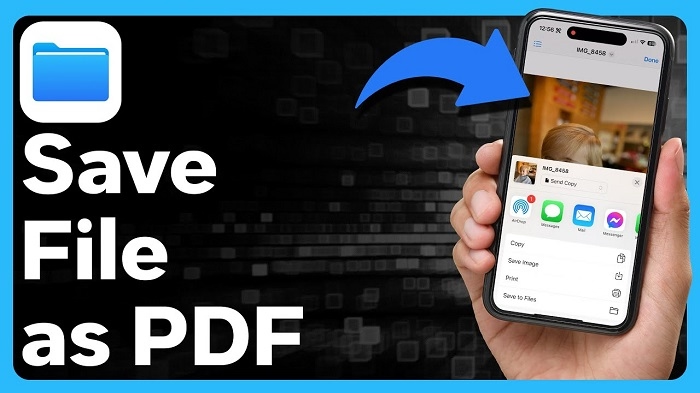
Basically:
you turn email into a downloadable document file.
Instead of living only inside the inbox…
it becomes regular PDF file on your:
- computer
- phone
- cloud storage
- hard drive
Very handy honestly.
Why People Save Emails as PDFs
Lots of reasons honestly.
Keeping Records
Receipts and invoices especially.
Legal Documentation
Contracts or agreements matter.
Offline Access
Useful when the internet disappears.
Sharing Emails
PDFs are easier to send around.
Preventing Accidental Deletion
Inboxes get messy honestly.
Why PDFs Are So Popular
Because PDFs work almost everywhere.
Phones.
Computers.
Tablets.
Printers.
Very universal honestly.
Can PDFs Preserve Email Formatting?
Usually yes honestly.
Most saved PDFs keep:
- images
- layout
- logos
- text formatting
pretty intact.
How to Save an Email as a PDF in Gmail
Gmail honestly makes this pretty simple.
Gmail Desktop Method
Usually:
- Open email
- Click printer icon
- Choose Print
- Select Save as PDF
- Save file
Done honestly.
Why “Print to PDF” Exists
Modern devices treat PDFs almost like virtual printers honestly.
Very convenient.
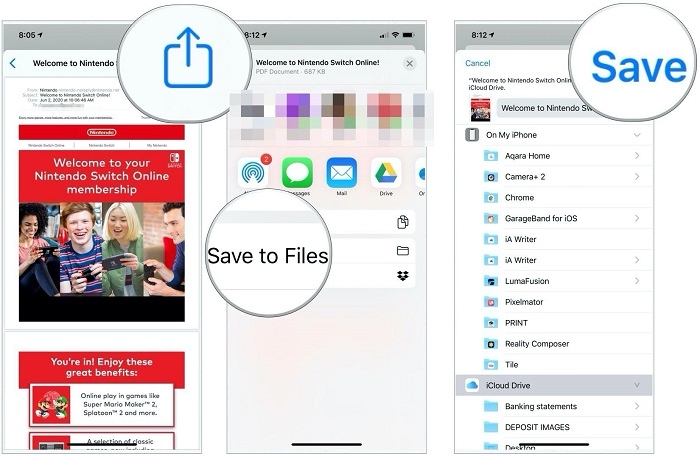
How to Save Gmail Emails as PDF on Phone
Usually:
- Open Gmail app
- Open email
- Tap three dots
- Choose Print
- Save as PDF
Works on both Android and iPhone mostly.
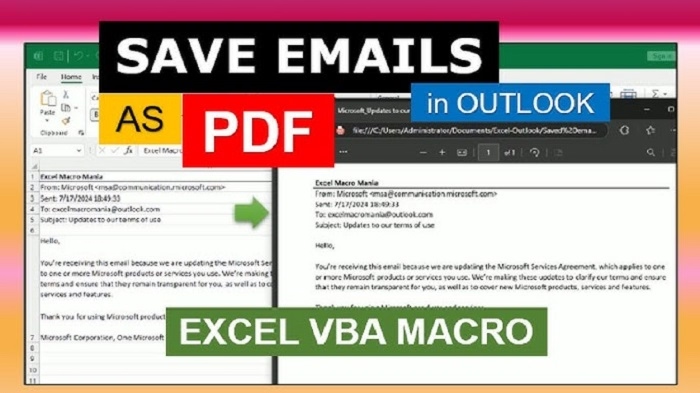
How to Save Emails as PDF in Outlook
Microsoft Outlook works similarly honestly.
Outlook Desktop Steps
Usually:
- Open email
- Click File
- Select Microsoft Print to PDF
- Save file
Very easy honestly.
Outlook Web PDF Saving
Browser version usually uses:
browser print system.
Still straightforward honestly.
How to Save Emails as PDF in Yahoo Mail
Yahoo Mail also uses print features.
Usually:
- Open message
- Print email
- Save as PDF
Simple honestly.
How Apple Mail Saves Emails as PDF
Apple Mail works especially smoothly on Macs.
Mac PDF Saving Steps
Usually:
- Open email
- Click File
- Select PDF dropdown
- Save as PDF
Very polished honestly.
Why Macs Handle PDFs So Well
macOS deeply integrates PDF tools honestly.
Apple built lots of PDF support directly into the system.
Can Email Attachments Be Included in PDF?
Usually not automatically honestly.
PDF saves email body mainly.
Attachments often require:
separate downloads.
How to Save Email Attachments Too
Usually:
- Download attachment separately
- Store with PDF file
Best approach honestly.
Can You Save Entire Email Threads as PDFs?
Yep honestly.
Very useful for:
- conversations
- legal discussions
- support records
- long email chains
Why Businesses Save Email Threads as PDFs
Documentation honestly.
Especially for:
- contracts
- approvals
- disputes
- communication history
Very important professionally.
Can PDFs Be Edited Later?
Depends honestly.
Basic PDFs:
mostly static.
But advanced software can edit them somewhat.
Why PDFs Feel More Permanent
Because they’re harder to accidentally modify honestly.
Good for records.
Can You Print Saved Email PDFs Later?
Absolutely.
That’s one major advantage honestly.
Can PDFs Preserve Images and Logos?
Usually yes.
Modern email-to-PDF conversion handles visuals pretty well honestly.
What Happens to Links Inside Email PDFs?
Often:
links still clickable.
Depends on the PDF creator honestly.
Why Saving Emails as PDFs Helps Organization
Because inboxes become overwhelming honestly.
PDF folders often easier for:
- receipts
- travel records
- tax documents
- warranties
Common Emails People Save as PDFs
Honestly lots.
Travel Confirmations
Flights and hotels.
Purchase Receipts
Online shopping especially.
School Documents
Applications and approvals.
Business Agreements
Very common honestly.
Medical Information
Appointments and reports.
Why PDF Backups Matter
Because email accounts aren’t forever honestly.
People lose access constantly through:
- hacks
- forgotten passwords
- deleted accounts
PDF backups reduce risk.
Can You Save Emails Automatically as PDFs?
With advanced automation tools honestly yes.
Mostly businesses use this though.
Why Companies Archive Emails as PDFs
Compliance and recordkeeping honestly.
Huge in:
- finance
- legal work
- healthcare
Can PDFs Protect Emails From Deletion?
Basically yes.
Once downloaded:
A separate independent copy exists.
Difference Between Screenshot and PDF
Huge honestly.
Screenshot
Just image.
Preserves:
- selectable text
- formatting
- links sometimes
- multiple pages
Way better for documents.
Can You Save Spam Emails as PDFs?
Sure honestly.
Useful sometimes for:
- reporting scams
- evidence
- fraud investigations
Are Email PDFs Secure?
Depends honestly.
PDF itself isn’t magically secure.
Still important to:
- use passwords
- encrypt sensitive files
- protect devices
Can Email PDFs Be Shared Easily?
Very honestly.
One major reason people use them.
Why Lawyers Save Emails as PDFs
Documentation matters massively honestly.
Especially:
- timestamps
- sender info
- written agreements
Can You Save Deleted Emails as PDFs?
Only if:
email is still recoverable first honestly.
Need access before saving.
Can Phones Save Emails as PDFs Easily?
Modern phones honestly handle this surprisingly well now.
Especially:
- iPhones
- Android devices
Very convenient.
Common Problems Saving Emails as PDFs
People hit these constantly.
Missing Formatting
Some layouts break slightly.
Large Images
PDF size becomes huge.
Attachments Missing
Very common misunderstanding.
Printer Settings Confusion
Especially older computers, honestly.
Why PDFs Sometimes Look Different Than Email
Because browsers and apps render email differently honestly.
Best Practices for Saving Emails as PDFs
Want cleaner saved files?
Do this stuff honestly.
Rename PDFs Clearly
Avoid random filenames.
Organize Into Folders
Huge help later.
Save Important Attachments Too
Very important honestly.
Back Up Important PDFs
Cloud storage helps massively.
Double-Check PDF Before Closing Email
Avoid saving broken files.
Can Cloud Storage Help Manage Email PDFs?
Absolutely.
Services like:
make organization easier honestly.
Why Students Save Emails as PDFs
Common for:
- acceptance letters
- assignments
- tuition receipts
- communication records
Why Freelancers Save Client Emails
Proof and documentation honestly.
Very important professionally.
FAQs About Saving Emails as PDFs
Can Gmail save emails as PDFs?
Absolutely.
Does Outlook support PDF saving?
Yep.
Are attachments included automatically?
Usually not honestly.
Can phones save emails as PDFs?
Definitely.
Why save emails as PDFs?
Better storage and organization.
Can PDFs preserve formatting?
Usually yes.
Are PDFs printable later?
Absolutely.
Can email PDFs be shared?
Very easily, honestly.
Honestly?
Saving emails as PDFs is one of those simple digital habits that becomes incredibly useful over time.
Because inboxes honestly aren’t great long-term storage systems for:
- important records
- receipts
- agreements
- travel documents
- business communication
Things get buried.
Deleted.
Lost.
Archived somewhere weird.
But PDFs?
Much easier to organize, back up, print, and keep safe long-term.
And once you realize how easy “Print → Save as PDF” actually is…
you’ll probably start doing it way more often than you’d expect.
