
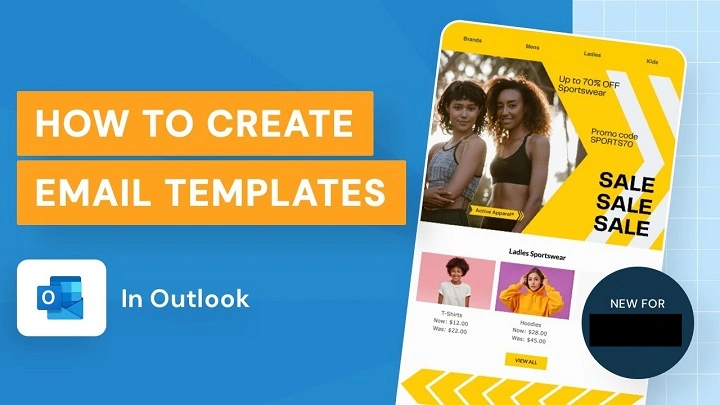
Ever type the same email over and over again?
Like:
- Meeting confirmations
- Customer replies
- Follow-ups
- Thank-you emails
- Support answers
- Status updates
And every single time you’re sitting there thinking:
“Didn’t I literally write this exact email yesterday?”
Yeah honestly…
That’s exactly why Outlook email templates exist.
Because people waste ridiculous amounts of time rewriting:
the same messages repeatedly.
And Outlook basically goes:
“Hey maybe… just save the email once.”
Pretty smart honestly.
Once you understand templates, they can seriously make work emails:
- Faster
- Cleaner
- More professional
- Less stressful
Especially if your job involves constant emailing.
Let’s break down exactly what Outlook email templates are, how they work, and why so many office workers completely rely on them every day.
What Are Email Templates in Outlook?
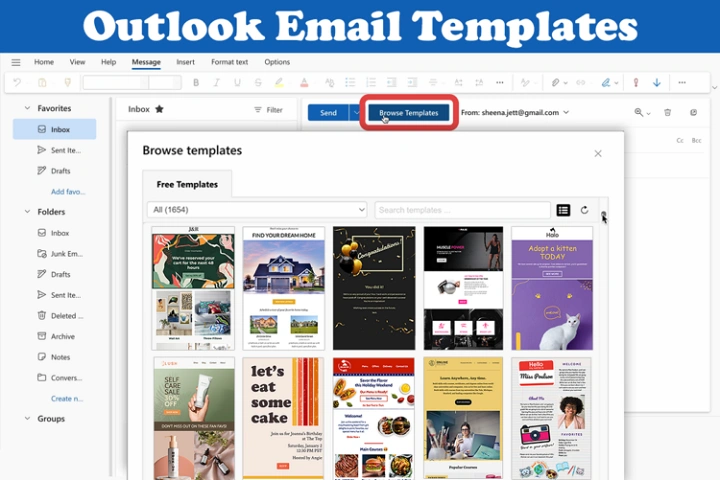
An Outlook email template is basically:
a reusable email message you save for later.
Instead of rewriting the same email repeatedly…
you open the template and reuse it instantly.
Very simple honestly.
Why Outlook Templates Matter So Much
Because modern work involves:
tons of repetitive emails.
Especially for:
- Customer support
- Sales
- HR
- Recruiting
- Scheduling
- Project management
Templates eliminate repetitive typing honestly.
What Can Outlook Templates Include?
Pretty much everything honestly.
Templates may contain:
- Subject lines
- Greetings
- Email body text
- Signatures
- Formatting
- Images
- Links
- Attachments sometimes
Very flexible.
Common Examples of Outlook Email Templates
Honestly people use templates constantly without realizing.
Meeting Responses
“Thanks for scheduling…”
Customer Support Replies
“We received your request…”
Follow-Up Emails
“Just checking back regarding…”
Job Recruitment Messages
“Thank you for applying…”
Sales Outreach
“Hope you’re doing well…”
Very common honestly.
Why Businesses Love Outlook Templates
Huge time savings honestly.
Especially when employees send:
similar messages all day.
Benefits of Using Email Templates
Honestly there are lots.
Saves Time
Biggest benefit easily.
Keeps Communication Consistent
Everyone sends similar professional responses.
Reduces Typing Errors
Less rewriting means fewer mistakes.
Improves Professionalism
Templates create cleaner communication.
Helps New Employees
Makes onboarding easier honestly.
Can Outlook Templates Be Customized Later?
Absolutely.
You can:
- Edit wording
- Add names
- Change dates
- Personalize details
Templates are starting points honestly.
Difference Between Templates and Drafts
People confuse these constantly.
Draft
Temporary unfinished email.
Template
Reusable saved structure.
Huge difference honestly.
How to Create an Email Template in Outlook Desktop
Usually easiest on desktop Outlook.
Step 1: Open New Email
Create a fresh message.
Step 2: Write Template Email
Add:
- Subject
- Body text
- Formatting
Everything you want reused.
Step 3: Save as Template
Usually:
File → Save As
Then choose:
Outlook Template (.oft)
Very important honestly.
What Is an .OFT File?
.OFT means:
Outlook Template File.
Basically reusable Outlook email format.
Step 4: Name the Template
Use clear names honestly.
Examples:
- Customer Follow-Up
- Interview Response
- Weekly Update
Makes templates easier to find later.
How to Use Outlook Email Templates
Usually:
- Open Outlook
- Open template file
- Customize details
- Send email
Very easy honestly.
Where Outlook Saves Templates
Usually in:
Templates folder inside Outlook files.
Can vary slightly depending on the Windows version honestly.
Can Templates Include Attachments?
Absolutely.
Very useful honestly.
Especially for:
- Contracts
- PDFs
- Pricing sheets
- Guides
- Forms
Huge time saver.
Can Outlook Templates Include Signatures?
Yep honestly.
Many templates already include:
company signatures automatically.
How Outlook Quick Parts Differ From Templates
Interesting difference honestly.
Templates
Entire reusable emails.
Quick Parts
Small reusable text snippets.
Like:
- Frequently used paragraphs
- Signatures
- Responses
- Legal disclaimers
What Are Quick Parts in Outlook?
Quick Parts lets you instantly insert:
saved text blocks into emails.
Very useful honestly.
Common Quick Parts Examples
Things like:
- “Thank you for your email.”
- “Please let me know if you need anything else.”
- Support disclaimers
- Company addresses
Tiny reusable sections.
Why Quick Parts Save So Much Time
Because lots of business writing repeats constantly honestly.
Can Outlook Templates Work on Web Version?
Sort of honestly.
Outlook Web supports:
My Templates feature.
Different from desktop .OFT files though.
How Outlook Web Templates Work
Usually:
- Open new email
- Click Apps or More Options
- Open My Templates
- Insert saved template
Pretty straightforward honestly.
Difference Between Outlook Desktop and Web Templates
Desktop Outlook:
more advanced and flexible.
Web Outlook:
simpler but easier for quick use.
Can Templates Be Shared With Teams?
Absolutely honestly.
Businesses often share:
approved company templates.
Especially for:
- Sales teams
- HR
- Customer support
Keeps communication consistent.
Read More: How do i Unarchive an Email
Why Consistent Emails Matter for Businesses
Consistency improves:
- Branding
- Professionalism
- Customer trust
Very important honestly.
Can Outlook Templates Improve Productivity?
Massively honestly.
Especially for heavy email users.
Saving even:
30 seconds per email
adds up insanely fast.
Why Templates Help Reduce Email Stress
Because blank screens honestly stress people out.
Templates remove:
Starting pressure.
Huge psychological help honestly.
Common Outlook Template Mistakes
People mess these up constantly.
Forgetting to Personalize
Big mistake honestly.
Sending:
“Hello [Customer Name]”
looks terrible.
Using Outdated Information
Old pricing or signatures create problems.
Making Templates Too Robotic
Overly stiff wording feels fake.
Too Many Templates
Organization becomes a nightmare honestly.
Best Practices for Outlook Templates
Want cleaner templates?
Do this stuff honestly.
Keep Templates Simple
Easy editing matters.
Personalize Important Emails
Don’t sound like a robot.
Update Templates Regularly
Avoid outdated info.
Use Clear Template Names
Organization matters massively.
Test Templates Before Heavy Use
Especially attachments and formatting.
Can Templates Include Images?
Yep honestly.
Very useful for:
- Marketing emails
- Company branding
- Signatures
Can Templates Include Hyperlinks?
Absolutely.
Common for:
- Booking links
- Websites
- Support portals
Why Sales Teams Use Templates Constantly
Because sales involves:
massive repetitive communication honestly.
Templates speed up:
- Outreach
- Follow-ups
- Scheduling
- Introductions
Huge efficiency boost.
Why Customer Support Teams Love Templates
Support agents answer:
same questions repeatedly.
Templates make responses:
faster and more consistent.
Can Outlook Templates Work With Automation?
Absolutely honestly.
Businesses combine templates with:
- CRM systems
- Email automation
- Workflows
- AI tools
Very powerful together.
Can Templates Sound Personal?
Definitely if written well honestly.
Good templates feel:
human and flexible.
Bad templates feel:
cold and robotic.
Why Human-Looking Templates Matter
Because people instantly notice:
copy-paste corporate language.
Natural tone matters honestly.
Can Outlook Templates Be Deleted?
Yep easily.
Usually:
delete .OFT files or remove web templates.
Simple honestly.
Why Employees Should Learn Templates Early
Because email efficiency matters hugely in modern offices honestly.
Templates save:
time
energy
mental effort
every single day.
FAQs About Outlook Email Templates
What is an Outlook email template?
Reusable saved email format.
What file type do Outlook templates use?
Usually .OFT.
Can templates include attachments?
Absolutely.
Are templates available in Outlook Web?
Yes through My Templates feature.
What’s the difference between templates and Quick Parts?
Templates are full emails. Quick Parts are reusable snippets.
Can teams share templates?
Definitely.
Do templates save time?
Massively honestly.
Can templates be personalized later?
Absolutely.
Honestly?
Outlook email templates are one of those features people ignore for years…
until they finally try them and immediately think:
“Wait… why wasn’t I doing this sooner?”
Because if your work involves:
sending similar emails repeatedly…
templates honestly become:
a huge productivity upgrade.
They save time.
Reduce stress.
Keep communication professional.
And stop you from rewriting the exact same message fifty times every week.
Which honestly?
Nobody enjoys doing it manually forever.
